- Published on
Lynx Download Manager Review: A Clever Mac App With a Few Trade-Offs
8 min read
- Authors
- Name
- Kiarash Soleimanzadeh
- https://go.kiarashs.ir/twitter


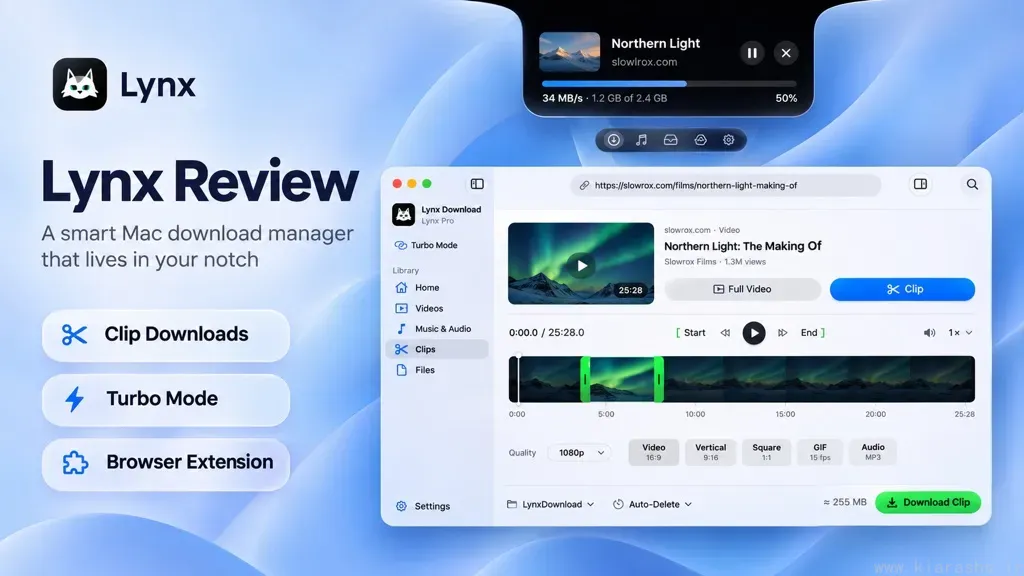
Table of Contents
Most of the time, downloading something on a Mac is simple enough: click a link, wait a little, and find the file in Downloads. But that simplicity starts to fall apart when a large transfer gets interrupted, you have several files to manage, or you only want a short moment from a long video.
Lynx Download Manager is trying to make those situations less annoying. Developed by Slowrox, it's a native Mac app that combines conventional file downloading with video clipping, browser integration, and controls built around the MacBook notch.
What interests me about Lynx isn't just the promise of faster downloads. It's the way the app tries to remove small, repetitive steps from the process. Some of its ideas are genuinely useful; others may depend on how you work. Here's what stands out to me, and where I'd like to see it improve.
The most interesting feature is Clip Download
If I had to pick one reason to look at Lynx, it would be Clip Download.
Suppose you're watching a lengthy tutorial and want to keep only the 40 seconds that explain a particular step. Normally, you might download the full video, open an editor, trim it, and export a smaller file. Lynx puts much of that workflow into the download itself: paste a supported video link, choose Clip, mark the beginning and end on a timeline, and save the section you need.
There's more flexibility here than I initially expected. Lynx offers regular video, vertical and square crops, GIFs, and audio-only output. It also supports precise start and end points and lets Pro users select multiple parts from one video. That makes it relevant not just for casual saving, but also for people collecting permitted excerpts for presentations, tutorials, or editing projects.
The important technical detail is that it doesn't always mean less data is downloaded. Lynx says it can fetch only the requested segment from compatible sources, but for some shorter videos it may retrieve the whole source before cutting the final file. The output is still the shorter clip; the bandwidth saving depends on the source. I appreciate that the developer explains this rather than treating every clip as an automatic speed or data-saving win.
For me, this feels like the feature most likely to justify Pro. It's also worth knowing upfront that Clip Download is not part of the permanent free tier.
A download manager that lives in the notch
The next thing that makes Lynx different is its interface. Instead of making you open a full window to check every download, Lynx can show progress and quick actions from the MacBook's notch. Copy a supported link and the app can offer a download right there. Macs without a physical notch get a similar floating area at the top of the screen.
It's a smart use of space that otherwise does very little. I like the idea of checking whether a transfer has finished without breaking focus or hunting through browser tabs.
Lynx takes the concept further with music controls, clipboard history, and a Shelf for temporarily keeping files within reach. The Shelf can surface actions such as sharing or converting files, and some of the more advanced clipboard and Shelf tools are part of the paid offering.
That said, I have mixed feelings about giving a download manager so many side jobs. For someone who already uses a clipboard manager or a separate notch utility, the overlap could feel unnecessary. I'd rather have a few well-executed controls than a growing collection of features competing for attention. Fortunately, the notch features are an extra convenience, not the only way to manage downloads.
The actual download-management features matter too
Underneath the interface, Lynx has a download engine called Pounce 2. It supports resuming interrupted transfers and downloading a file over multiple connections when the server allows it.
The free Basic plan supports up to eight connections per file and three simultaneous downloads. Pro raises those limits to 32 connections per file and 10 downloads at once. Lynx also describes recovery after interruptions such as dropped Wi-Fi, sleep, and restarts. These are the kinds of features I expect from a serious download manager, especially for large archives and software installers.
But more connections don't automatically mean a faster result. The server's limits, the type of file, and your own network are often the deciding factors. I haven't run controlled transfer-speed comparisons between Lynx, a browser, and competing download managers, so I wouldn't claim a particular percentage improvement. I'd judge Lynx on whether it makes downloads more reliable and easier to manage first, with speed gains as a possible bonus.
One feature worth mentioning is Turbo Mode. It can combine the Mac's Wi-Fi with an iPhone's cellular connection, using a cable and Personal Hotspot. That's clever if your Wi-Fi is struggling and you have a strong mobile connection. It's less attractive if you have limited mobile data. I would definitely want to keep an eye on data usage when downloading large files this way.
Browser integration and selective downloads
Lynx supports browser integration with Safari, Chrome, Edge, Brave, Arc, and other Chromium-based browsers. On supported pages, its browser button can send a file or video to the app, and it can offer quality and Clip options for eligible videos.
This is the sort of feature that matters more in everyday use than it sounds on paper. If a download manager adds several extra clicks, I probably won't use it for ordinary files. A browser extension helps close that gap.
I also like Lynx's approach to public Google Drive folders. Rather than forcing you to grab an entire shared folder, the app can display its contents so you choose which files to save. The developer lists support for folders containing up to 1,000 files. For anyone dealing with shared project resources or large collections, selective downloading makes more sense than downloading everything and cleaning up afterward.
There are limits, of course. Lynx doesn't bypass DRM, so it isn't a way to save protected streams. And a browser or website changing how it serves media can affect which downloads work. That's true of this category generally, but it's worth remembering when a product advertises broad video support.
Free versus Pro: Is there enough value?
I appreciate that Lynx doesn't make you subscribe just to download ordinary files. Every installation begins with a 14-day Pro trial, with no card or account required, and then falls back to Lynx Basic unless you choose to pay.
Basic continues to offer unlimited direct-file downloads, resumable transfers, up to ten whole-video downloads a day at up to 1080p, and core notch and browser features. That's useful enough that a casual user may never need Pro.
Pro is more compelling if you regularly need Clip Download, playlist downloads, higher video resolutions, or greater concurrency. Lynx offers monthly, yearly, and lifetime purchase options; the current amounts and promotions are listed on its pricing page.
I prefer this model to an app that stops working completely when a trial ends. Still, whether Pro makes sense depends on how often you'll use its more specialized features. If all you need is an occasional PDF or ZIP download, the free version—or even your browser—may already be enough.
What I'd like Lynx to improve
A few things would make me more confident recommending it broadly.
First, platform support is narrow. Lynx currently requires an Apple silicon Mac running macOS 14 or later. Intel Mac owners are out of luck, and there's no Windows version at the moment. That may help the developer keep the Mac experience polished, but it's a real limitation.
Second, Firefox support is missing from the browser-extension lineup. Safari and Chromium coverage is good, but Firefox users shouldn't have to change browsers to get the full convenience of an extension.
Third, I'd like to see more independent, repeatable performance data. The download engine and Turbo Mode sound capable, but a clear comparison across large and small files, fast and slow servers, and stable and unreliable connections would make their value easier to judge.
Finally, the app needs to keep its priorities straight. The notch, music, clipboard, and Shelf are distinctive, but downloads should remain the center of the experience. More customization over which extras are visible would help people who prefer a minimal setup.
None of these concerns makes Lynx a bad product. They're the trade-offs I'd think through before deciding whether it deserves a permanent place on my Mac.
My verdict
Lynx has a more interesting pitch than “download the same files, but faster.” Its Clip Download tool tackles a real inconvenience, while the notch controls and browser integration aim to make common actions quicker. The free tier is reasonably capable, and I like that you can try Pro without entering payment details.
I wouldn't call it the fastest download manager on the market without independent benchmarks, and I wouldn't suggest paying for Pro if your downloading needs are basic. The extra utilities may also be a plus for some people and clutter for others.
But if you work with video excerpts, download large files regularly, or simply like well-integrated Mac utilities, Lynx looks worth a try. Start with the free trial, use it for your own typical downloads, and see which features you actually come back to. That's a better test of its value than any feature checklist.
Website: lynxdownloadmanager.com