- Published on
Sweeper for macOS Review: The App Uninstaller That Actually Cleans Up After Itself
12 min read
- Authors
- Name
- Kiarash Soleimanzadeh
- https://go.kiarashs.ir/twitter


Table of Contents
- Sweeper for macOS Review: The App Uninstaller That Actually Cleans Up After Itself
- TL;DR
- A Cleaner Way to Uninstall Mac Apps
- The Best Feature: You Can See What Is About to Be Deleted
- Orphaned Files: Cleaning Up Apps You Deleted Months Ago
- Login Items and Extensions Are Built In
- SmartDelete Makes Normal Trash Deletion More Useful
- Alfred and Terminal Support Are Excellent Power-User Extras
- Privacy: Full Disk Access, but Local Processing
- A Small Detail I Really Like: Quarantine
- The Interface Feels Like a Mac App
- Support Is a Real Strength
- What I Would Improve
- 1. macOS 15+ limits the audience
- 2. Full Disk Access may make cautious users uncomfortable
- 3. Orphan scanning can require judgment
- 4. Casual users may not need it
- One-Time Purchase Instead of Another Subscription
- Who Is Sweeper Best For?
- Final Verdict
- My recommendation
Sweeper for macOS Review: The App Uninstaller That Actually Cleans Up After Itself
Dragging an app to the Trash on macOS feels wonderfully simple. The problem is that the app itself is often only part of what gets installed.
Preferences, caches, support files, containers, launch agents, saved state, extensions, and other small pieces can remain scattered across your Library long after the main .app bundle is gone. Most of the time those leftovers are harmless, but after years of installing, testing, and removing software, they can add up — both in storage and in clutter.
That is exactly the problem Sweeper is designed to solve.
I have tried plenty of Mac utilities that promise to "clean" a system, and I am generally cautious with them. Sweeper makes a better first impression because it does not behave like an aggressive one-click cleaner. It is much closer to a transparent app-uninstallation tool: it scans, explains what it found, lets you review the files, and only then removes what you approve.
After spending time with the app and looking closely at how it approaches cleanup, my impression is straightforward: Sweeper is one of those focused Mac utilities that does one job, does it carefully, and stays out of the way.
And one thing deserves to be mentioned early: their support is excellent. Good software matters, but responsive and genuinely helpful support makes a noticeable difference when the utility has access to important parts of your Mac.
TL;DR
Sweeper is a macOS app uninstaller and cleanup utility that can:
- show installed apps and their real disk footprint,
- find the files an app leaves behind,
- scan for orphaned files from apps you removed in the past,
- manage login items,
- inspect app extensions,
- move deleted material into quarantine so it can be restored,
- work from a graphical interface, Alfred, or the Terminal,
- run locally without uploading your app list or cleanup results,
- and do all of this without a recurring subscription.
The two main caveats are that it requires Full Disk Access to perform its job properly and it currently requires macOS 15 Sequoia or later.
For people who regularly install and remove software — developers, researchers, reviewers, power users, or anyone who likes a tidy Mac — Sweeper is easy to recommend.
A Cleaner Way to Uninstall Mac Apps
The main Apps view is intentionally simple. Instead of presenting a collection of mysterious "system cleaning" categories, Sweeper starts with something understandable: your installed applications.
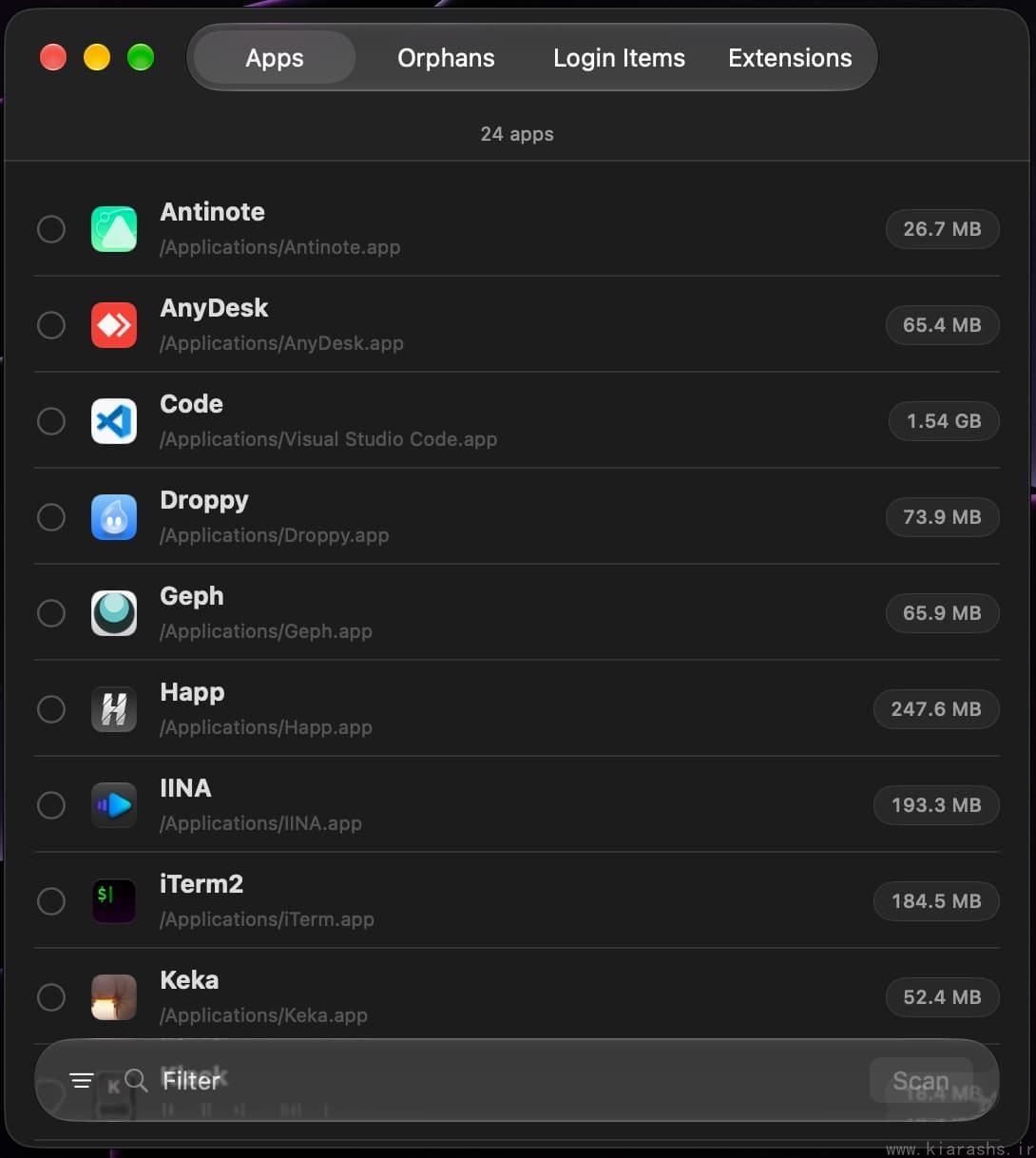
Sweeper lists installed applications, their locations, and their disk usage before you scan one for related files.
Select an application, scan it, and Sweeper looks for the files associated with that app.
This is where the product starts to feel more thoughtful than simply dragging an app to the Trash. macOS applications can leave data in many places, including:
~/Library/Application Support~/Library/Preferences- caches
- containers and group containers
- saved application state
- logs
- HTTP storage
- launch agents
- crash reports
- login items
- extensions
Sweeper understands these common locations and groups the results instead of dumping a giant unexplained list in front of you.
The Best Feature: You Can See What Is About to Be Deleted
A cleanup app should never make important decisions invisibly.
Sweeper's review screen is probably the feature I appreciate most because it makes the deletion process explicit. After scanning an application, it shows the files it believes are related to that app, grouped by type.
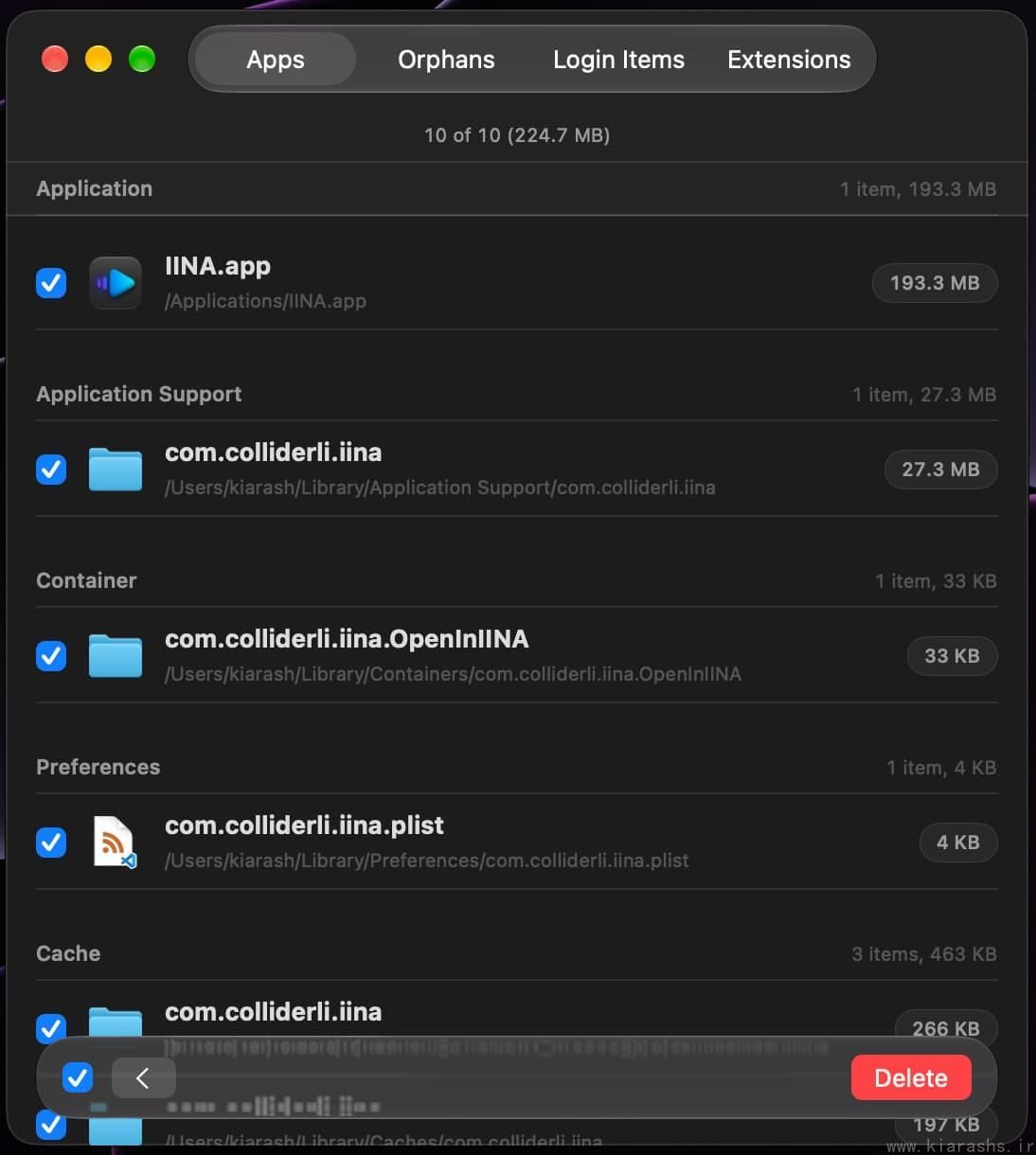
Before deleting anything, Sweeper groups related files and lets you decide exactly what should go.
That matters.
Some uninstallers are built around the idea that the user should never need to know what is happening. Sweeper takes the opposite approach: automation is useful, but review is still important.
According to Parcse, exact matches can be selected automatically while less-certain matches are left for you to confirm. That is a sensible balance. The app saves time without pretending that every file relationship is perfectly obvious.
Another reassuring detail is that removed files are placed in quarantine rather than being permanently destroyed immediately. If you realize that you removed something you still needed, you can restore it before emptying the quarantine.
That single design choice makes Sweeper feel much safer than the stereotypical "Clean Now" utility.
Orphaned Files: Cleaning Up Apps You Deleted Months Ago
This is the feature that may uncover the most surprising amount of clutter.
The Orphans section searches for files belonging to applications that are no longer installed.
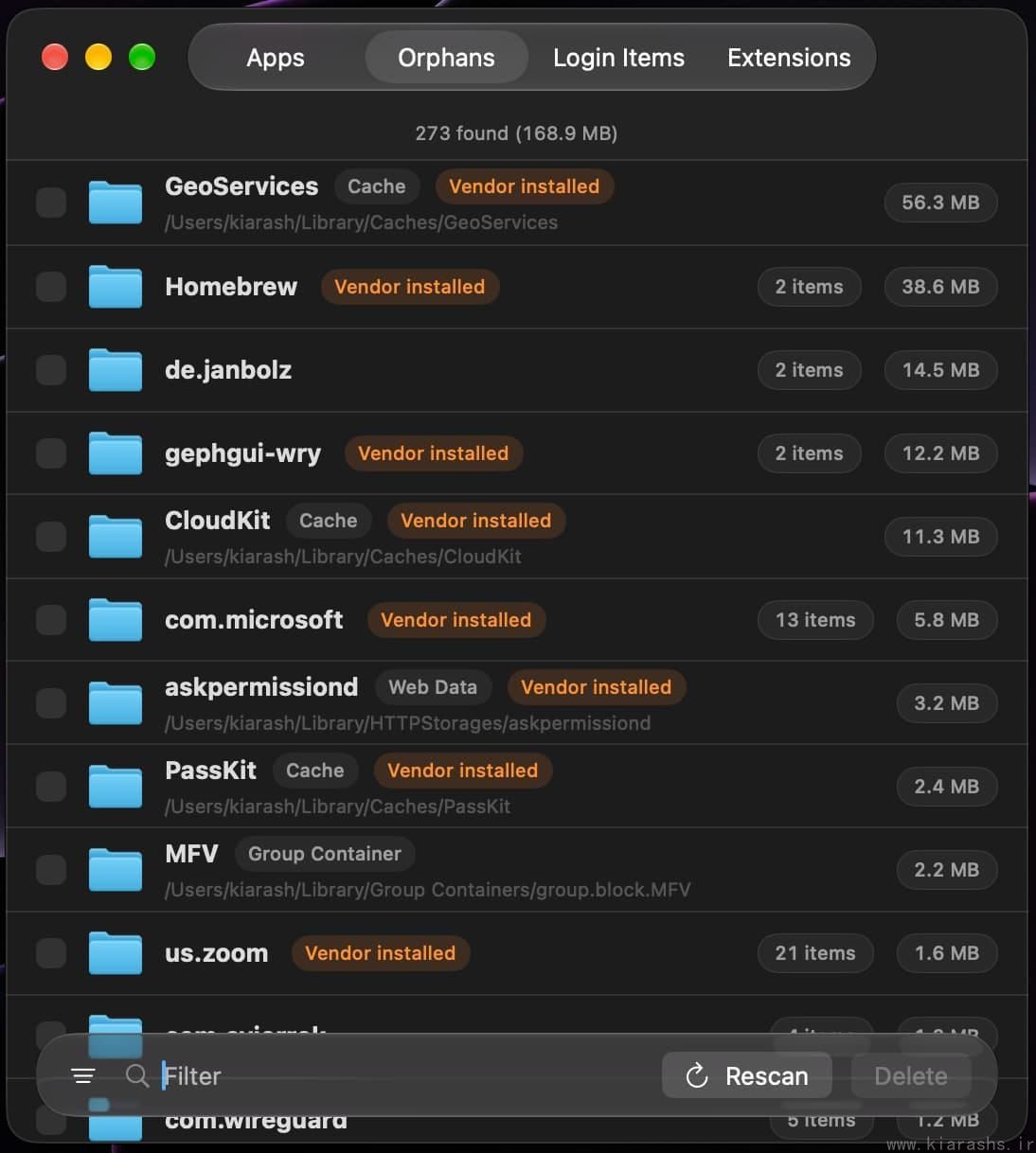
The Orphans view looks for leftovers from apps that have already been removed and labels the type of data it finds.
This is especially useful if you have had the same Mac installation for years.
You may have removed an app long ago and completely forgotten about it, while its support files, containers, preferences, or background items stayed behind. Sweeper can surface those remnants and group them in a way that is much easier to inspect than manually digging through ~/Library.
Recent updates have also improved how Sweeper handles orphaned content. Version 1.3.2, for example, added scanning for background items left behind by removed apps and improved leftover matching so that files belonging to still-installed applications are less likely to be caught accidentally.
That kind of update is important for an uninstaller. The quality of the matching logic matters far more than having a long list of flashy features.
Login Items and Extensions Are Built In
Sweeper goes beyond deleting application files.
It also includes dedicated views for Login Items and Extensions.
This is useful because uninstalling the main application is not always the end of the story. Some software installs background helpers, Finder integrations, importers, share extensions, or startup items.
Instead of hunting through multiple parts of System Settings, Sweeper gives you one place to audit what applications have added.
For users who troubleshoot slow startup, unwanted background behavior, or simply want to understand what launches with macOS, this is a genuinely practical addition.
SmartDelete Makes Normal Trash Deletion More Useful
Sweeper also includes SmartDelete, which is meant to clean up after applications you drag to the Trash normally.
That is a clever idea because it does not require you to completely change your existing macOS habits.
You can still remove an app in the familiar way, while Sweeper helps identify the associated pieces that the standard Trash workflow would leave behind.
For people who do not want to open a dedicated uninstaller every time, this makes Sweeper feel less like a separate maintenance ritual and more like an enhancement to normal macOS behavior.
Alfred and Terminal Support Are Excellent Power-User Extras
One of my favorite things about Sweeper is that the GUI is not the only way to use it.
The app ships with:
- an Alfred workflow, and
- a command-line interface.
That means you can search for an app and start an uninstall from Alfred, or work directly from the Terminal if that is where you are already spending your time.
This will not matter to everyone, but for developers and other keyboard-first users, it is the kind of detail that turns a nice Mac utility into something that fits naturally into an existing workflow.
Sweeper has also continued improving these power-user features. Its changelog includes fuzzy search in the Alfred workflow, Finder and Ignore List actions, and improvements that make the command-line tool follow the app's settings.
Privacy: Full Disk Access, but Local Processing
The obvious question with an app like this is:
Why does an uninstaller need Full Disk Access?
The answer is practical: if Sweeper is going to find files scattered throughout your Library, it needs permission to see them.
Full Disk Access is a significant permission, and users should always think carefully before granting it. The positive side here is that Parcse states that Sweeper performs its work locally on the Mac and does not upload your application list, file paths, or cleanup results.
That is the right model for this category of utility.
There is also additional protection around system-owned files, and recent versions have improved safeguards around sensitive locations such as Keychain and Mail data.
I still recommend reviewing what Sweeper selects before deleting — which, fortunately, is exactly how the application is designed to be used.
A Small Detail I Really Like: Quarantine
The quarantine feature deserves more attention than it might get at first glance.
Deleting application leftovers can occasionally be complicated. Maybe an app shares data with a companion app. Maybe a preference file turns out to matter. Maybe you simply change your mind.
Sweeper's approach is to make cleanup reversible until you deliberately empty the quarantine.
This reduces the psychological cost of cleaning. You do not have to treat every checkbox like an irreversible decision.
For a utility whose job is literally to remove files, that is good product design.
The Interface Feels Like a Mac App
Sweeper does not try to look like a giant maintenance dashboard.
The interface is compact, focused, and familiar. The four main areas — Apps, Orphans, Login Items, and Extensions — are easy to understand, and the information hierarchy is good.
The app has also received practical interface improvements rather than unnecessary redesigns. Version 1.3 added filter bars throughout the lists, keyboard controls such as Command-F and Command-A, better window-state handling, and faster app-size loading.
These are small changes individually, but together they make the app pleasant to use.
It feels like software built for people who actually spend time on macOS rather than a cross-platform cleaner wrapped in a Mac skin.
Support Is a Real Strength
Software support is easy to ignore in a review until something goes wrong.
My experience with Parcse's support has been genuinely great. They are helpful and responsive, and the interaction feels much more personal than the support experience you often get from larger utility vendors.
That matters particularly for an app like Sweeper because users may have questions about permissions, leftover files, or whether a particular item is safe to remove.
A technically good utility backed by poor support would be much harder to trust. Sweeper benefits from having both the product and the support experience working in its favor.
What I Would Improve
No review is useful if it only lists positives.
1. macOS 15+ limits the audience
Sweeper currently requires macOS 15 Sequoia or later. If you have an older Mac that cannot run Sequoia, this is simply not an option.
2. Full Disk Access may make cautious users uncomfortable
The permission is understandable and necessary for deep scanning, but Full Disk Access is still one of macOS's most powerful privacy permissions.
Sweeper's local processing and review-first design make me more comfortable with it, but the permission requirement is still worth knowing before installation.
3. Orphan scanning can require judgment
A good orphan scanner will sometimes show files that need human interpretation.
That is not necessarily a flaw; in fact, I would rather Sweeper show questionable leftovers than silently delete them. But if you expect a completely brainless "press one button and everything is perfect" cleaner, Sweeper deliberately is not that kind of tool.
4. Casual users may not need it
If you install three apps a year and almost never remove anything, the built-in macOS workflow may be enough for you.
Sweeper makes the most sense for people who frequently test software, install developer tools, review applications, or have accumulated years of app leftovers.
One-Time Purchase Instead of Another Subscription
Another point in Sweeper's favor is its licensing model.
The standalone app is sold as a one-time purchase, with updates delivered through the app. In a market where even tiny utilities increasingly ask for monthly or yearly subscriptions, that is refreshing.
Parcse also offers a broader "Supporter" membership for people who want access to its full collection, but Sweeper itself does not require a subscription.
I would still check the official website for the current price before purchasing, since pricing can change.
Who Is Sweeper Best For?
I think Sweeper is particularly well suited to:
Developers and technical users
You probably install and remove more software than the average Mac owner, and the Terminal/Alfred support fits naturally into that workflow.
App reviewers and beta testers
If you constantly try new software, leftovers accumulate quickly.
Long-time Mac users
The Orphans scan can help reveal years of forgotten files.
People who care about transparency
Sweeper shows what it is going to remove rather than hiding everything behind a single cleanup button.
Users who dislike subscriptions
The one-time purchase model is a welcome change.
Final Verdict
Sweeper is not trying to be an antivirus, optimizer, memory booster, duplicate finder, VPN, and twelve other things at once.
That is exactly why I like it.
It focuses on a very specific macOS problem: applications leave files behind, and users deserve a safe, understandable way to clean them up.
The combination of app uninstalling, orphan detection, login-item management, extension auditing, quarantine, Alfred integration, and a command-line interface makes it more capable than a basic drag-and-drop uninstaller without turning it into an overcomplicated maintenance suite.
The privacy approach is sensible, the review-before-delete workflow inspires confidence, and the interface feels appropriately Mac-like.
Add the excellent support experience, and Sweeper becomes a very easy utility to appreciate.
My recommendation
If you regularly install and remove Mac applications and want more control than simply dragging them to the Trash, Sweeper is absolutely worth a look.
It does not try to scare you with warnings or promise to "speed up your Mac by 300%." It simply shows you what an application left behind and gives you a clean, reversible way to deal with it.
Sometimes the best utilities are the ones that solve one annoying problem properly.
Sweeper is one of them.